
Field Manuals How To Start The Machine Lesson IV
Categorize What Moneyball Found
Group the raw stages, lead sources, services, and sales reps Moneyball discovered so the system understands how your team thinks about the business.
Part I
Moneyball Has Read The Data. Now It Needs Your Labels.
After you publish your first configuration, Moneyball reads through your CRM or spreadsheet data and discovers the values your team has been using. That means it now knows the services you sell, the lead sources you track, the sales reps it found, and the stages your deals have moved through.
Now Moneyball asks you to help with some simple cleanup.
Your company may offer forty different services, but internally those services probably roll up into a smaller set of service lines. Your CRM may have lead source values like Google Ads, Facebook Ads, PPC, Google PPC, and Paid Social, but your team may think about those as broader channels like Paid Search and Paid Social.
Same with sales reps. You might have ten reps, but you may want to compare the South vs. North divisions, Team Matt vs. Team Jesse, or one manager’s team against another.
Categorization teaches Moneyball that extra context. It gives you cleaner reporting, unlocks more useful ways to slice the data, and gives you a light cleanup tool for the friendly little mayhem cave known as the CRM.
Categorization changes how Moneyball organizes what it found. It does not edit the CRM, spreadsheet, or connected source.
Part II
Open Categorizations
Open Admin → Categorization. You should see cards for the main things Moneyball can organize.
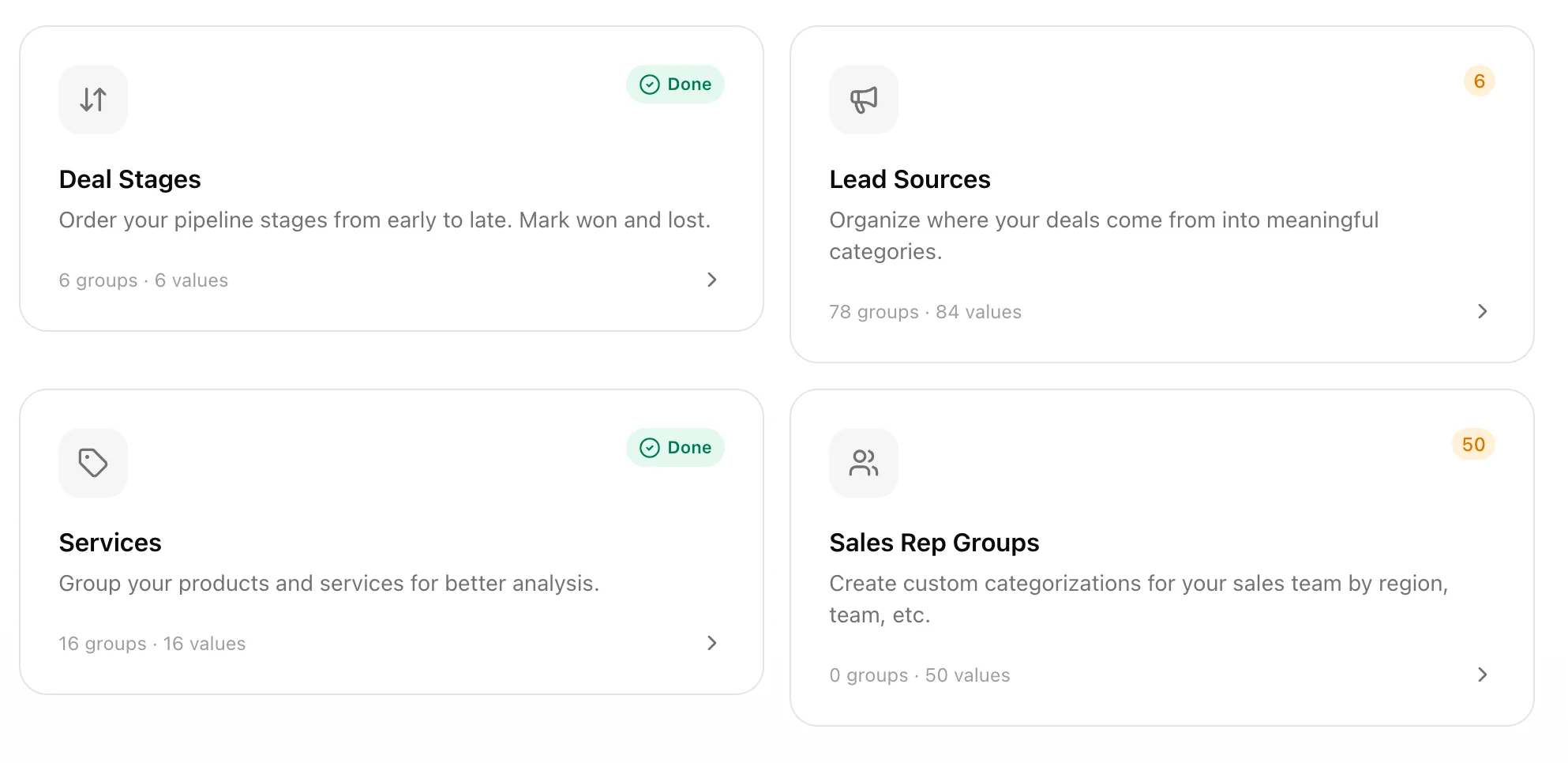
The cards show:
- Deal Stages. Order your pipeline stages from early to late, then mark won and lost outcomes.
- Lead Sources. Group where your deals came from into cleaner categories.
- Services. Group products and services into the lines of business your team actually uses.
- Sales Rep Groups. Create custom ways to group your sales team, such as region, team, or division.
A green Done badge means that section has no uncategorized values left. An orange number means Moneyball found values that still need attention.
Moneyball uses two plain ideas throughout this section:
- Values are the raw things Moneyball found in your data.
- Groups or categories are the buckets you create to organize those values.
Part III
Sort Lead Sources And Services Into Groups
Lead Sources and Services use the same card-sort tool. We will use Lead Sources as the example.
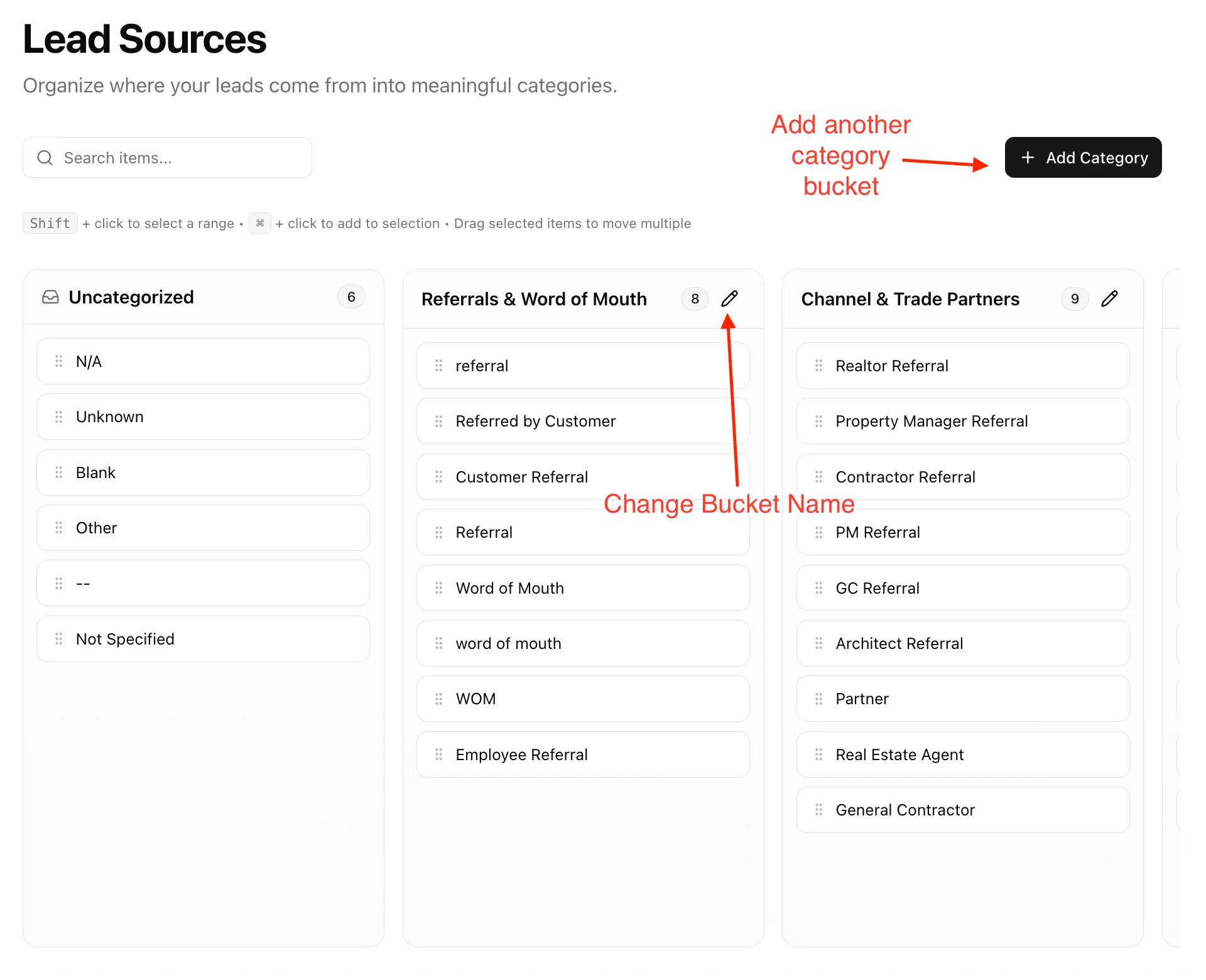
The left bucket is Uncategorized. Every discovered value starts there unless you have already sorted it. Anything left in Uncategorized belongs to the Uncategorized group.
You will usually want to move most values out of that bucket. Moneyball keeps it because your CRM changes over time. New values get added. Old fields get renamed. Somebody invents “Google PPC - Website??” on a Friday. When Moneyball finds a new value later, it will land in Uncategorized so you can decide where it belongs.
1. Add a category
Click Add Category and give the category a useful name. The category name is what Moneyball treats the values inside that bucket as.
For example, you might create:
- Paid Search
- Referrals & Word of Mouth
- Channel & Trade Partners
- Events
- Organic Website
2. Drag values into the category
Drag values from Uncategorized into the right category. If you have ever used Trello, Jira, Linear, or another Kanban board, this should feel familiar.
For example:
- Google Ads, Google PPC, and PPC might go into Paid Search.
- referral, Referred by Customer, Customer Referral, WOM, and Employee Referral might go into Referrals & Word of Mouth.
- Realtor Referral, Contractor Referral, PM Referral, and Partner might go into Channel & Trade Partners.
3. Use the helper tools when the list is long
The search box helps you find values quickly. You can also select more than one value at a time. Shift-click selects a range. Command-click adds individual values to your selection. Then drag the selected values together.
The number on each category shows how many values are inside it. Use the pencil icon if you need to rename a category.
4. Let autosave do its job
Categorization autosaves as you work. You do not need to hunt for a giant save button after every drag.
Services work the same way. The only difference is what you are sorting: product names, service names, package names, SKUs, line items, or whatever your source uses to describe what you sold.
Part IV
Create Sales Rep Groups
Sales Rep Groups are optional. Lead Sources, Services, and Deal Stages are highly encouraged because they directly affect how Moneyball reads pipeline performance. Sales Rep Groups are for extra ways you may want to compare people — by region, team, division, manager, or whatever structure matters to you.
Sales reps also have one extra step because there are multiple ways you might want to group the same people.
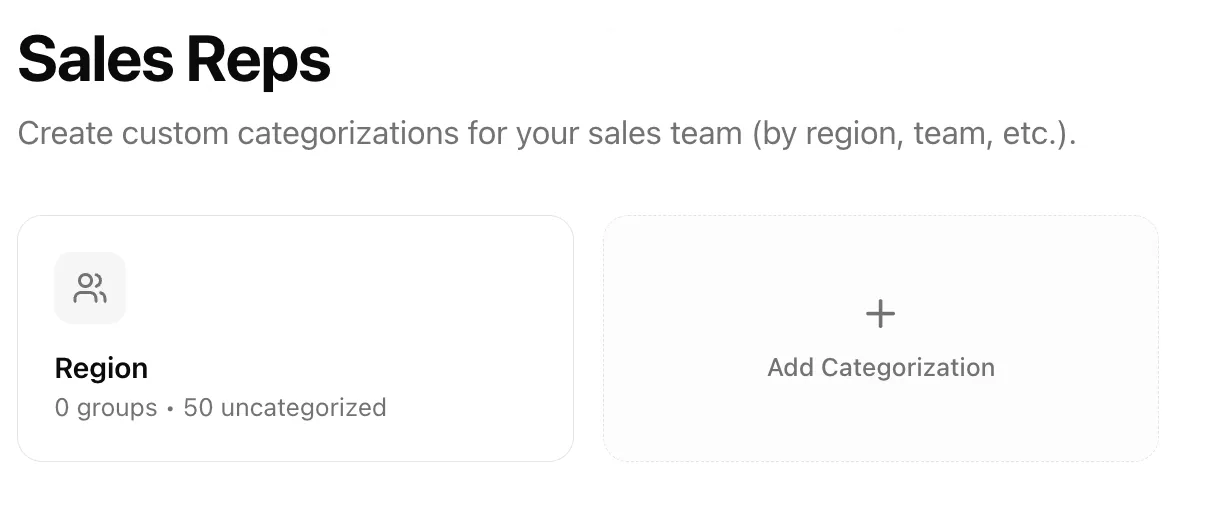
Lead Sources and Services each have one obvious thing to organize. Sales reps can be organized through different lenses:
- Region
- Team
- Division
- Manager
- Territory
- Seniority
So first, create a sales rep categorization. Think of the categorization as the lens. The groups inside it are the buckets.
For example, you might create a categorization called Region. Inside Region, you might create groups called South, North, East, and West. Or you might create a categorization called Team with groups called Team Matt and Team Jesse.
After you create or open a sales rep categorization, the sorting interface works like Lead Sources and Services. Move reps out of Uncategorized and into the groups where they belong.
Part V
Order Deal Stages
Deal Stages are similar in spirit but different in shape. Moneyball does not just need categories here. It needs to understand the path a deal takes through your sales process.
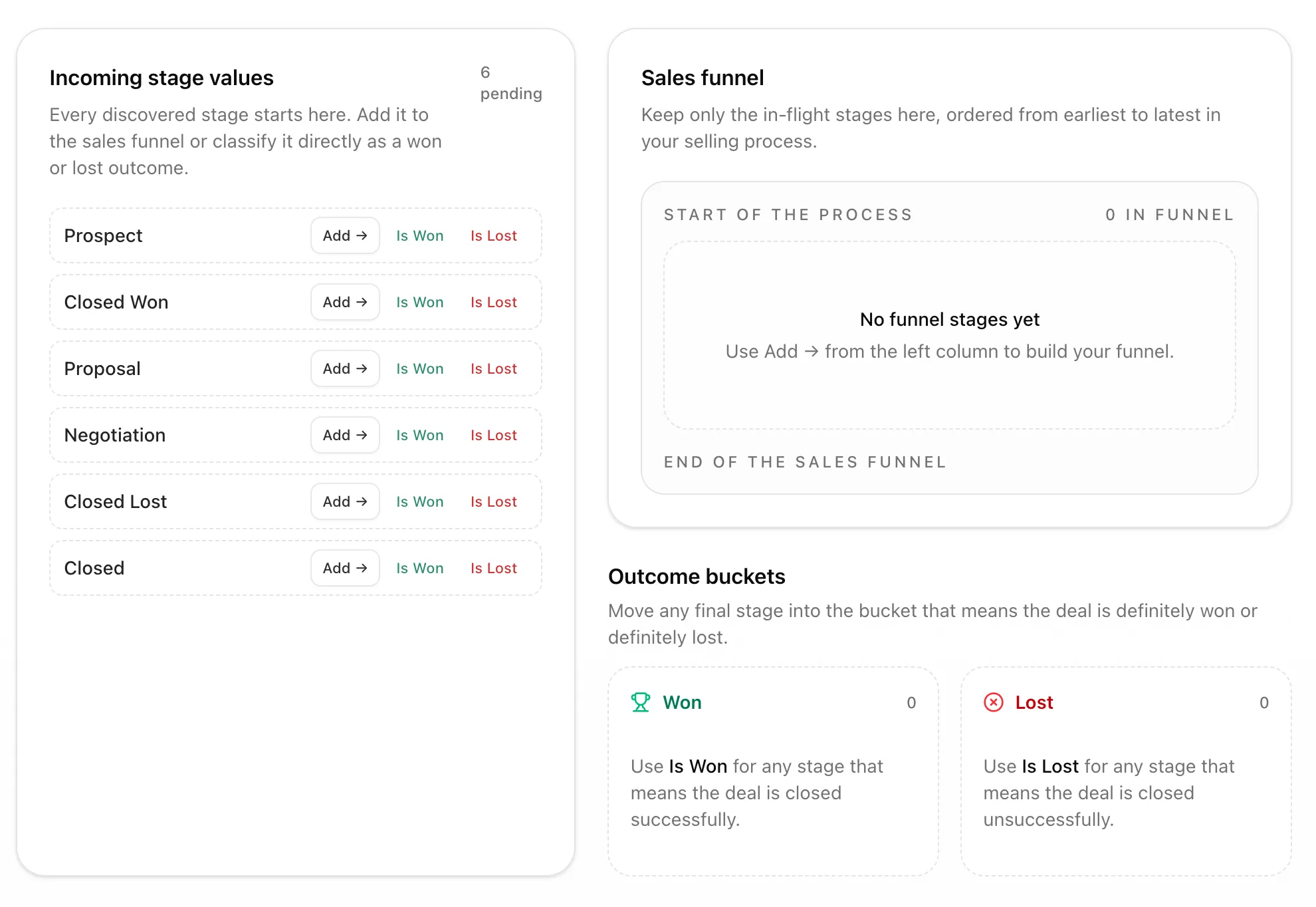
Incoming stage values start on the left. Each value needs to go to one of three places:
- Sales funnel. Use this for in-flight stages, ordered from the start of your process to the end.
- Won. Use this for any stage that means the deal closed successfully.
- Lost. Use this for any stage that means the deal closed unsuccessfully.
1. Put active stages in the funnel
If a stage represents a deal that is still moving through the sales process, add it to the Sales Funnel. Then order the funnel from earliest to latest.
For example:
- Prospect
- Proposal
- Negotiation
The exact names do not matter. The order does. Moneyball is trying to understand how deals flow from early interest to final outcome.
2. Put final outcomes in Won or Lost
If a stage means “we won it,” put it in Won. If a stage means “we lost it,” put it in Lost.
Closed Won belongs in Won. Closed Lost belongs in Lost. A generic Closed value depends on how your team used it. If Closed meant lost in your historical data, put it in Lost. If it meant something else, place it accordingly.
3. Finish with nothing pending
When everything has been placed, the Incoming Stage Values bucket will be empty.
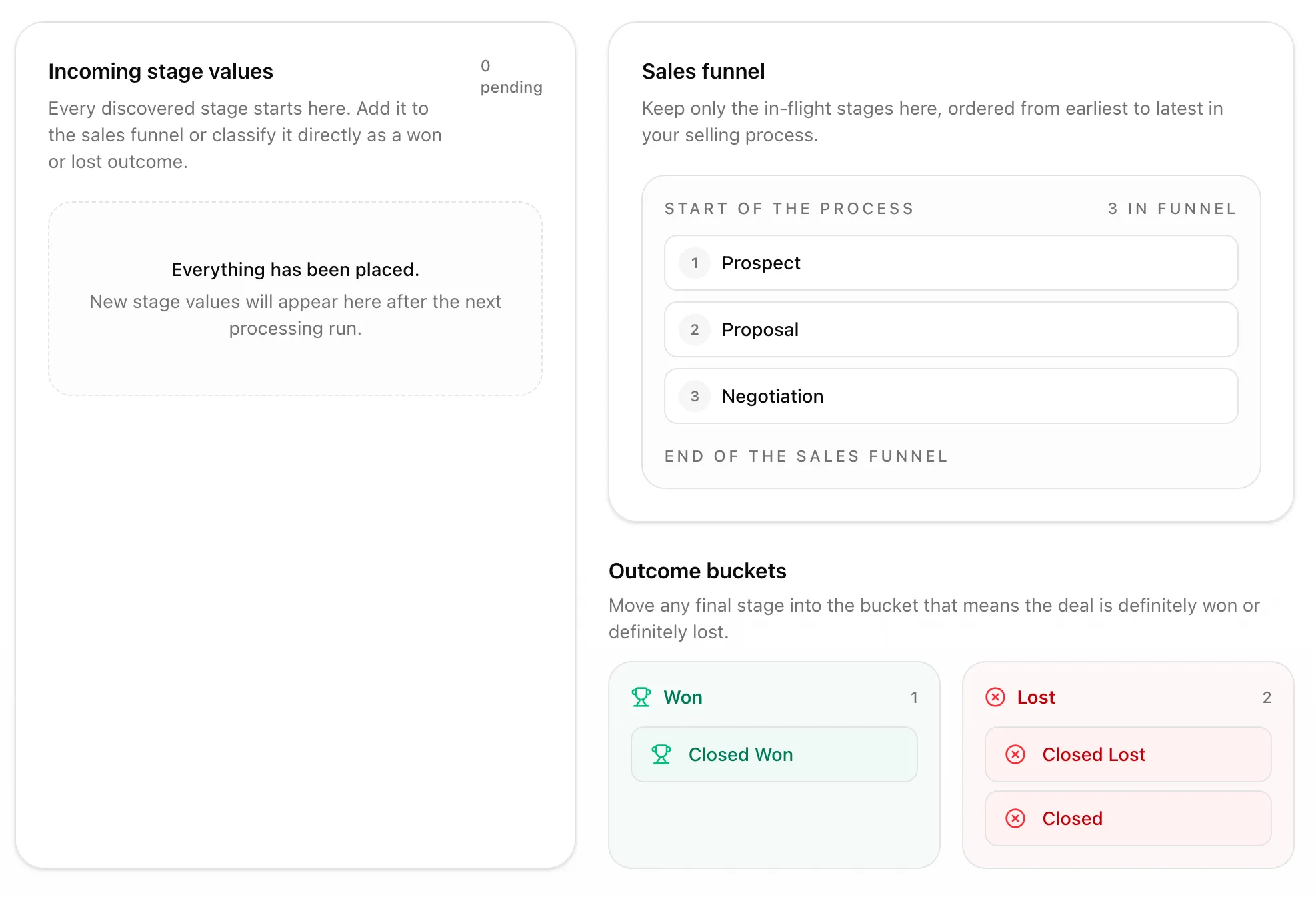
New stage values may appear here after a future processing run. That is normal. If your CRM changes over time, Moneyball will surface the new value so you can decide where it belongs.
Why not automate all of this by reading your CRM? Because Moneyball looks across the history of the company, not just today’s clean dropdown. Teams rename stages. Old stage values stay in historical records. Moneyball asks you because you know whether an old value was part of the funnel, a win, or a loss.
Part VI
Move Or Merge Stage Values
The stage ordering screen also has a context menu for quick cleanup. Hover over a stage and click the three dots.
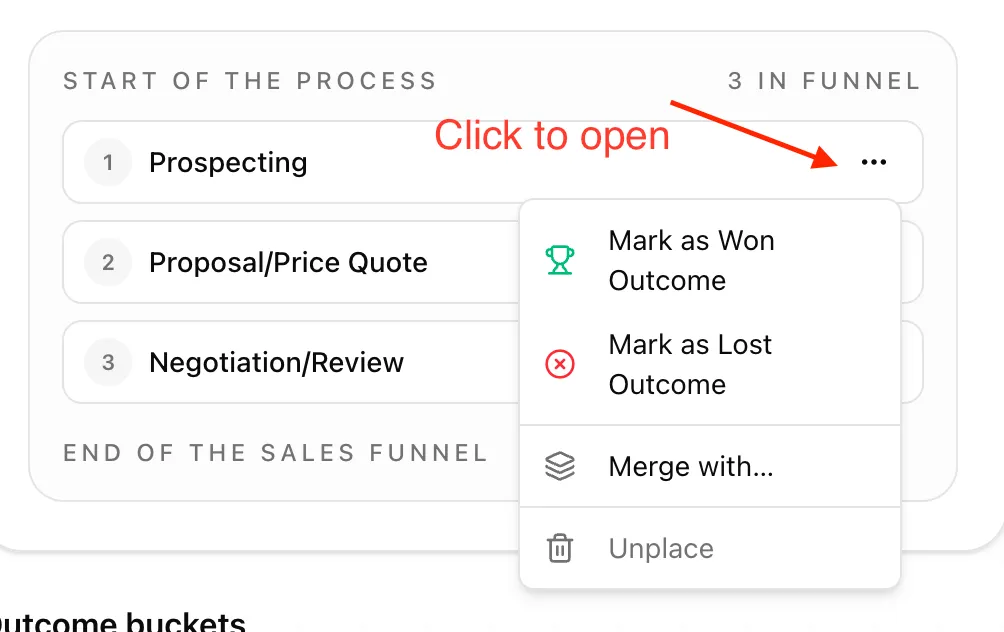
From that menu, you can:
- mark a stage as a Won outcome,
- mark a stage as a Lost outcome,
- merge it with another stage,
- or unplace it if you need to move it back out of the funnel or outcome buckets.
Merging is useful when two or more raw stage names mean the same thing in your business.
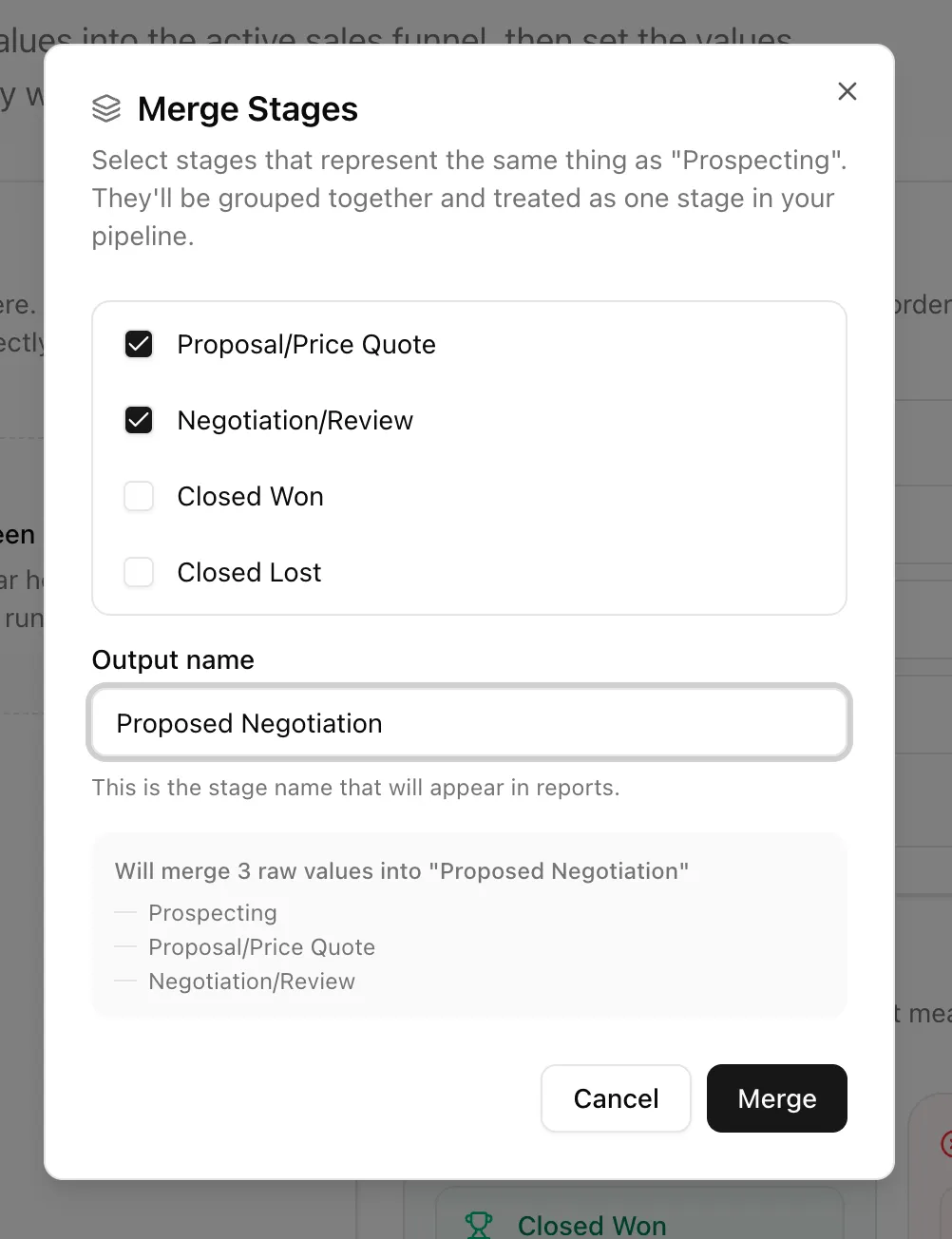
Select the stages that represent the same step, then give the merged stage an output name. That output name is what appears in reports.
For example, if Proposal/Price Quote and Negotiation/Review were historically used for the same step, you can merge them into one stage name your team understands today.
Part VII
You Are Ready To Invite The Team
Once Deal Stages, Lead Sources, Services, and Sales Rep Groups look reasonable, you have given Moneyball the context it needs to speak your team’s language.
You can keep refining categories later. New values may appear as the CRM changes. That is not failure. That is a living sales system doing living sales system things.
Next up: invite the team.